I was looking for an Emacs Lisp book that covers how to customize and extend the Emacs environment in Lisp, not just the language or the editor, and a new edition of this book crossed my feeds. I guess I have something to read over the winter holydays.
Apropos of nothing, this is a project I started some time ago. Due to the community’s lack of interest and financial support, I kind of stopped working on it. Sharing it again just to test the waters - if there’s enough interest, I might feel motivated to work on it again. (Issues and PRs welcome!)
IDEmacs aims to be a set of #Emacs configurations which provide an out-of-the-box experience similar (if not identical) to popular GUI IDEs and editors.
It is aimed at…
Programmers coming to Emacs from other IDEs, or even first-time programmers familiar with only office applications.
Beginner #CommonLisp and #Scheme programmers, who need the functionality of Emacs (Sly/Geiser + structural editing) without having to perform unnecessary setup and without dealing with an alien style of keybindings. In other words, similar to Portacle or Guile Studio.
Non-programmers who want a fully-featured #Org, #Markdown …
Apropos of nothing, this is a project I started some time ago. Due to the community’s lack of interest and financial support, I kind of stopped working on it. Sharing it again just to test the waters - if there’s enough interest, I might feel motivated to work on it again. (Issues and PRs welcome!)
IDEmacs aims to be a set of #Emacs configurations which provide an out-of-the-box experience similar (if not identical) to popular GUI IDEs and editors.
It is aimed at…
Programmers coming to Emacs from other IDEs, or even first-time programmers familiar with only office applications.
Beginner #CommonLisp and #Scheme programmers, who need the functionality of Emacs (Sly/Geiser + structural editing) without having to perform unnecessary setup and without dealing with an alien style of keybindings. In other words, similar to Portacle or Guile Studio.
Non-programmers who want a fully-featured #Org, #Markdown, or #LaTeX editor with idiomatic shortcuts and mouse-friendly GUI.
It aims to provide…
GUI and mouse support, in addition to a keyboard-driven interface.
Unlike most starter kits, we do not hide GUI elements by default.
We support configuration via the custom GUI, not just Elisp
If resources allow, we may implement new GUIs in Emacs
Keybindings that follow popular GUI and IDE conventions.
CUA mode is just the start - much more keybinding configuration is needed to provide an unsurprising experince. And that’s before we even get to the IDE-specific keybindings.
This excludes starter kits that use Evil by default, such as Spacemacs or Doom.
A fully-featured, fast, and configuration-free Emacs experience, like any starter kit/distro.
The configuration uses idiomatic Elisp and contains a generous amount of comments, valuable to anyone interested in learning to configure Emacs using Elisp.
Perfectly imitating the GUIs and subtle behaviour differences of IDEs is desirable, but not top priority. Given our limited resources, we aim for “good enough”.
We hope this gives new users a comfortable starting point, and make them more likely to stick around to discover the possibilities of Emacs’ malleability, rather than being driven off by the default experience.
Tyblog posted an introduction to extending Emacs by exploration and introspectability. It's something advanced users know well but the post is a nice resource as it puts together what newcomers need to know to get started with extending the editor.
Tyblog posted an introduction to extending Emacs by exploration and introspectability. It's something advanced users know well but the post is a nice resource as it puts together what newcomers need to know to get started with extending the editor.
…which are two files that define most of what you could call the the Emacs Lisp “core” language (by which I mean macros like defun and lambda).
With these files now loaded, I can proceed to the next task, which is implementing enough of the C-level built-in functions in Scheme to be able to run ./lisp/emacs-lisp/cl-lib.el, which is in-turn one of the dependencies for running the Emacs Regression Tests (ERT) suite.
Once ERT is up and running, it will be much easier for anyone to contribute code to this project as you will just be able to pick a failing regression test and write whatever code is necessary to make it pass.
…which are two files that define most of what you could call the the Emacs Lisp “core” language (by which I mean macros like defun and lambda).
With these files now loaded, I can proceed to the next task, which is implementing enough of the C-level built-in functions in Scheme to be able to run ./lisp/emacs-lisp/cl-lib.el, which is in-turn one of the dependencies for running the Emacs Regression Tests (ERT) suite.
Once ERT is up and running, it will be much easier for anyone to contribute code to this project as you will just be able to pick a failing regression test and write whatever code is necessary to make it pass.
Progress on my clone of the Emacs Lisp interpreter
This took me three months (a month longer than I had hoped), but I finally have merged it into the main branch!
This patch rewrites the Emacs Lisp lexer and parser in Scheme using Scheme code that is 100% compliant with the #R7RS standard, so it should now work across all compliant Scheme implementations. Previously the old parser relied on #Guile -specific regular expressions.
This patch also implements a new feature where a stack trace is printed when an error occurs. This of course makes debugging much, much easier. Previously the old parser did not keep track of where code evaluation was happening, it simply produced lists without source location information. The new parser constructs an abstract syntax tree (AST) and source locations are attached to the branches of the tree which can be used in error reporting …
Progress on my clone of the Emacs Lisp interpreter
This took me three months (a month longer than I had hoped), but I finally have merged it into the main branch!
This patch rewrites the Emacs Lisp lexer and parser in Scheme using Scheme code that is 100% compliant with the #R7RS standard, so it should now work across all compliant Scheme implementations. Previously the old parser relied on #Guile -specific regular expressions.
This patch also implements a new feature where a stack trace is printed when an error occurs. This of course makes debugging much, much easier. Previously the old parser did not keep track of where code evaluation was happening, it simply produced lists without source location information. The new parser constructs an abstract syntax tree (AST) and source locations are attached to the branches of the tree which can be used in error reporting and stack traces.
Next I will make whatever minor tweaks might be necessary to get my Emacs Lisp interpreter run on other Scheme implementations, in particular MIT Scheme, Gambit, Stklos, and Gauche. I would also like to try to get it running on Chicken and Chez, although these are going to be a bit more tricky.
Then I will continue with the task of implementing a new declarative GUI library.
"You don't have to like Emacs to like it" - this seemingly paradoxical statement is the secret of GNU Emacs. The plain, 'out of the box' Emacs is a generic tool. Most people who use it, customize it to suit themselves.
Ok, I've read all chapters, but I'm not setting this book as read until I finish some exercises (and read appendixes). I'm especially interested in the plain text graphs library since I enjoy data visualization whenever I can work on it.
Another note to myself. I've used yank-pop first time today. I knew of kill-ring but never bothered to delve deeper since no other software I'm using implements it in a way to store more elements on the clipboard.
And I have my eyes on the next goals as well: The Emacs Lisp Elements by Protesilaos Stavrou. I'll try to read it on my e-ink screen, because I'm not utilizing it enough (it would be so nice to have touch screen gestures to scroll working on my #debian with #i3).
And after that, I'll check if there are any simple packages that need co-mainteners. #EmacsLisp
Ok, I've read all chapters, but I'm not setting this book as read until I finish some exercises (and read appendixes). I'm especially interested in the plain text graphs library since I enjoy data visualization whenever I can work on it.
Another note to myself. I've used yank-pop first time today. I knew of kill-ring but never bothered to delve deeper since no other software I'm using implements it in a way to store more elements on the clipboard.
And I have my eyes on the next goals as well: The Emacs Lisp Elements by Protesilaos Stavrou. I'll try to read it on my e-ink screen, because I'm not utilizing it enough (it would be so nice to have touch screen gestures to scroll working on my #debian with #i3).
And after that, I'll check if there are any simple packages that need co-mainteners. #EmacsLisp
I'm loving the gentleness of introduction that this book provides. It goes slowly through the code examples and shows you how to read the #EmacsLisp code.
And a spoiler: Here is my attempt for the Chapter 8 exercise: (defun test-search (string) "Search for string and left a point there if it is found." (interactive "sSearch for: ") (let ((found) (current (point)) (len (length string))) (save-excursion (while (and (< (+ len current) (point-max)) (not found)) ;; why complicate? just whole string on each position. (if (string-equal string (buffer-substring-no-properties (point) (+ (point) len))) ;; we found the string (progn (message "Found!") (setq found t) ) (progn ;; else (setq current (+ 1 current)) (forward-char) ) ) ) ) (when found ;; we found the string so we move the point. (goto-char (+ current len)) ) ) )
I'm loving the gentleness of introduction that this book provides. It goes slowly through the code examples and shows you how to read the #EmacsLisp code.
And a spoiler: Here is my attempt for the Chapter 8 exercise:
(defun test-search (string)
"Search for string and left a point there if it is found."
(interactive "sSearch for: ")
(let ((found)
(current (point))
(len (length string)))
(save-excursion
(while (and (< (+ len current) (point-max)) (not found))
;; why complicate? just whole string on each position.
(if (string-equal string (buffer-substring-no-properties (point) (+ (point) len)))
;; we found the string
(progn
(message "Found!")
(setq found t)
)
(progn
;; else
(setq current (+ 1 current))
(forward-char)
)
)
)
)
(when found
;; we found the string so we move the point.
(goto-char (+ current len))
)
)
)
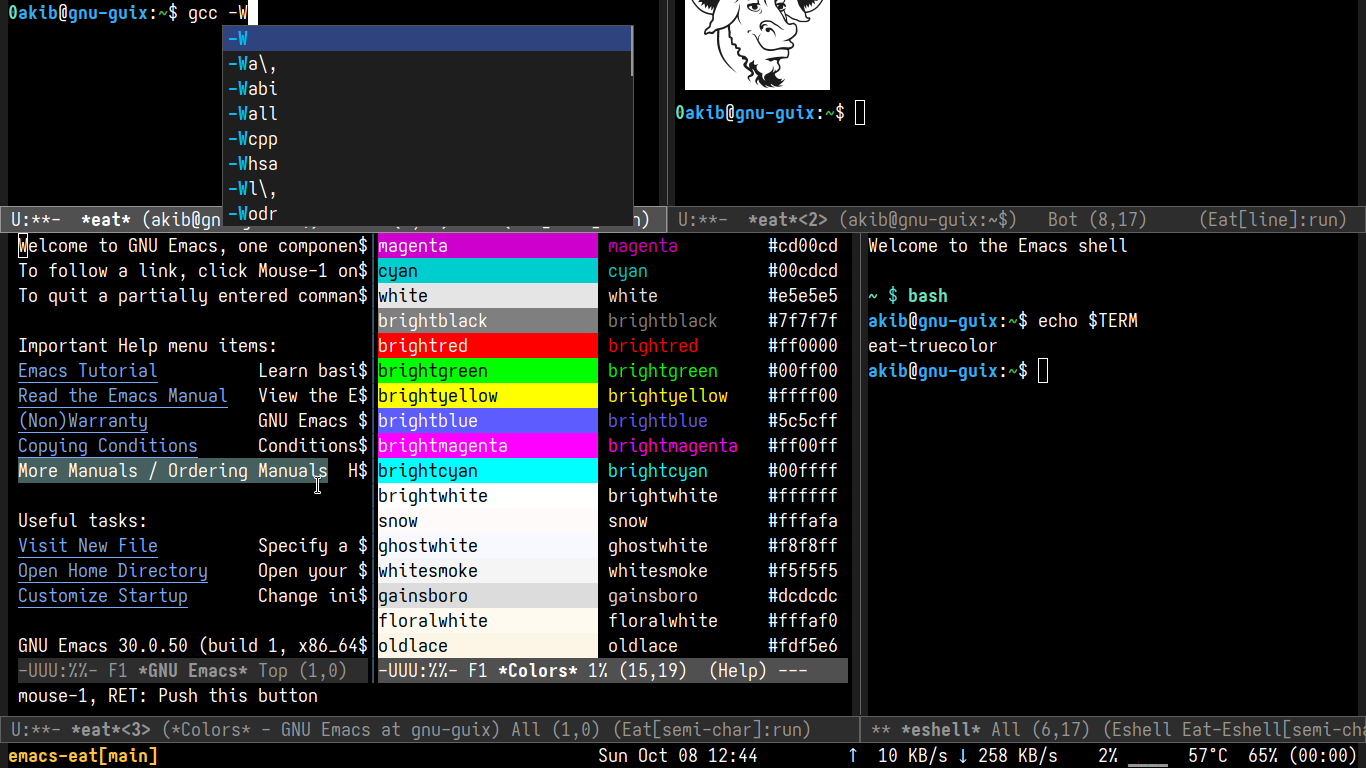
Notable changes include support for #Emacs 26, #Sixel support, line mode (like Term mode's one), and various bug fixes (including that cursor jumping bug).
#Eat is a reasonably fast #terminal emulator for #Emacs written entirely in #EmacsLisp/#Elisp, with various features like shell intergration, 24bit colors, complete mouse support and Sixel support, etc. It can run most (if not all) full-screen terminal programs.
Notable changes include support for #Emacs 26, #Sixel support, line mode (like Term mode's one), and various bug fixes (including that cursor jumping bug).
#Eat is a reasonably fast #terminal emulator for #Emacs written entirely in #EmacsLisp/#Elisp, with various features like shell intergration, 24bit colors, complete mouse support and Sixel support, etc. It can run most (if not all) full-screen terminal programs.
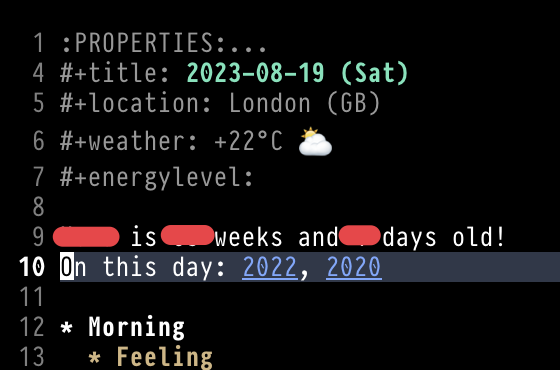
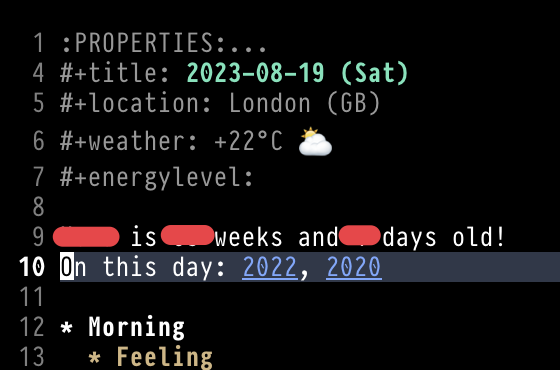
Just wrote some #emacslisp to add a "On this day" field to my #orgroam daily note template, with links to dailies written on this day in previous years. That was fun!